
Why your contact form emails go to spam
Your form works. The notification never arrives, or arrives in Junk. The cause is almost always the same one line — and it is not your host.
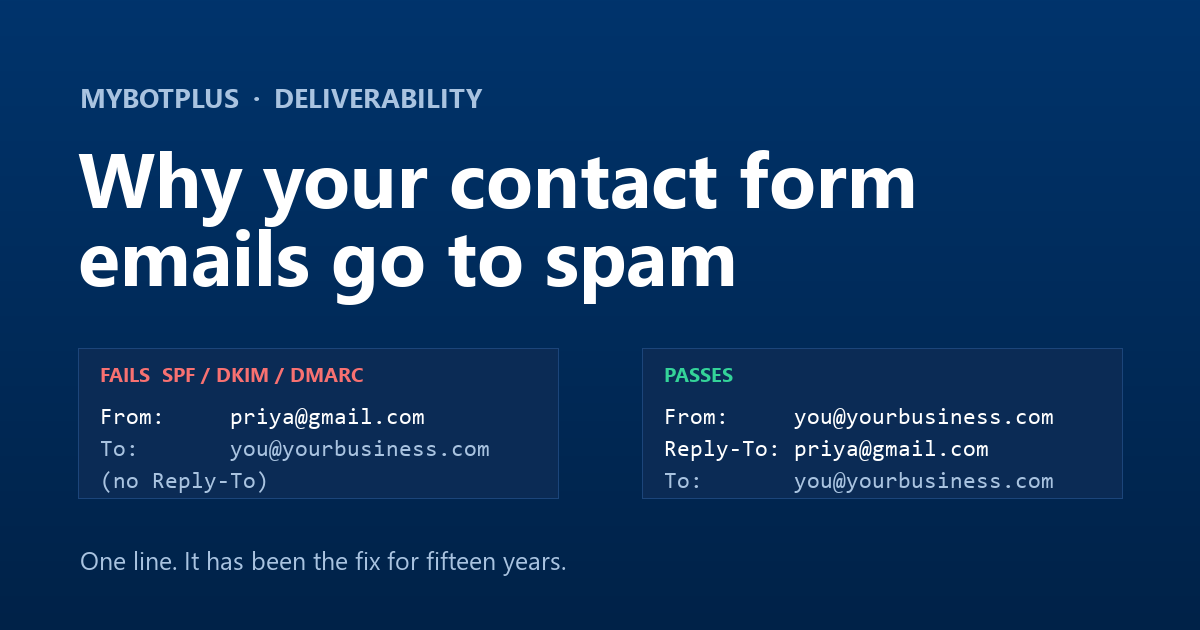
You add a contact form. You test it yourself and the email arrives. Weeks later a customer mentions they filled it in twice and never heard back, and you find three enquiries sitting in Junk — or nothing at all, because they were rejected before they ever reached a folder.
Almost every time, the cause is one design decision buried in the form, and it has nothing to do with your hosting company.
The mistake: sending mail as the person who filled the form in
Nearly every contact form plugin does this, and on the face of it, it is sensible. Somebody called Priya submits your form, so the notification is built like this:
From:     priya@gmail.com
To:       you@yourbusiness.com
Subject:  New enquiry from your website
Now you can hit Reply and it goes to Priya. Lovely. Except your web server
just told Gmail's mail servers that it is sending mail on behalf of
gmail.com — which it very much is not.
Why that fails, in plain terms
Email has three overlapping checks that exist to stop exactly this. You do not need to configure them to understand the problem, only to know what they are asking.
SPF — "is this server allowed to send for that domain?"
Every domain can publish a list of the servers permitted to send email using
its name. Gmail publishes one. Your shared host is not on it, and never will
be. So when your server sends mail claiming From: priya@gmail.com,
the receiving server checks Gmail's list, does not find you, and marks the
message as failing SPF.
DKIM — "is this signed by whoever it claims to be from?"
A properly sent message carries a cryptographic signature that only the real domain owner can produce. Your server cannot sign as Gmail. So the message arrives with no valid signature for the domain in the From line.
DMARC — "what should I do when the first two fail?"
This is the one that turned a slow leak into a wall. A domain can publish a
policy saying what to do with mail that fails SPF and DKIM:
none (do nothing), quarantine (send it to Junk) or
reject (refuse it outright).
Gmail, Yahoo and Outlook have all tightened this over recent years, and most
large providers now publish quarantine or reject.
So a form notification forged as a Gmail address is no longer a borderline
case. It is a message the receiving server has been explicitly told to bin.
The maddening part is that it fails silently and inconsistently. It works when you test with your own address on the same domain. It works for the first few months while the enquiries happen to come from smaller providers. Then somebody with a Gmail address fills it in and disappears.
The fix is one line, and it is the boring one
Send the notification from your own domain, and use
Reply-To for the visitor:
From:     enquiries@yourbusiness.com
Reply-To: priya@gmail.com
To:       you@yourbusiness.com
Subject:  New enquiry from your website
Now the From line names a domain your mail server is genuinely allowed to
send for, so SPF and DKIM pass. And Reply-To does the thing you
actually wanted the whole time: hitting Reply in any mail client on earth
writes back to Priya, not to yourself.
That is the entire fix. It has been the fix for fifteen years. The reason it is still worth writing down is that a great many form tools still get it wrong, and the failure never shows up in the place you would look.
The second problem: sending from someone else's server
Some form tools avoid the forging problem by sending everything through
their own shared mail relay instead. Your notification arrives from
something like noreply@formtool-mail.com.
SPF and DKIM now pass, so it usually lands. But two new problems arrive with it:
- You are sharing a reputation. That relay is sending for thousands of other accounts. When enough of them get reported as spam, the whole relay's reputation drops — and your enquiries start landing in Junk because of what somebody else's form sent.
- Your customer sees a stranger's domain. If the tool also sends an automatic acknowledgement to the person who filled the form in, that arrives from a name they have never heard of, about a business they were talking to. Some of them mark it as spam, which makes the first problem worse.
What to check on your own form, today
Whatever tool you use, four things are worth checking. Send yourself a test submission from a Gmail or Outlook address — not from an address on your own domain, because that is the one case that always works.
- Open the received message and look at the From line. If it shows the address of the person who filled the form in, that is your problem. It should show an address on your own domain.
- Press Reply. It should address the visitor, not you. If it addresses you, the tool has no Reply-To set and you will be copying addresses by hand for ever.
-
Check "Show original" (Gmail) or the message headers.
You are looking for three words:
spf=pass,dkim=pass,dmarc=pass. Any of them sayingfailtells you exactly which of the three checks above is being tripped. - Look at where it landed. Inbox, Promotions and Junk are three different outcomes, and only the first one means somebody will read it that day.
What we do, and why it asks something of you
MyBotPlus sends every form notification and every auto-reply through your own mail server — the one you connect in Settings. Gmail, Outlook, Brevo, or any standard SMTP host you already pay for.
That is more setup than "it just works out of the box", and it is worth being straight about why we ask for it anyway:
- Your mail arrives from your domain, which is what makes SPF, DKIM and DMARC pass rather than fail.
- Your acknowledgement to the customer comes from your business name, not ours, so it reads like you and not like a tool.
- Nobody else's spam can affect your delivery, because you are not sharing a relay with anybody.
- There is no per-email charge, ever, because we are not the ones paying to send it.
The one thing we will not do is let it fail quietly. Until your mail server is connected, submissions are still saved, still shown in your inbox on the site, still exported to CSV and still filed in your CRM — and every one of those screens carries a banner saying that nothing is being emailed yet. A form that looks like it is working while dropping your enquiries is worse than one that tells you the truth.
Build a contact form and connect your own mail server in about a minute. Every enquiry it collects becomes a contact in your CRM, ready to quote and invoice — see how it works.
Forms that email properly, and then do something
Connect your own mail server once. Every enquiry lands in your inbox, from your own address, and becomes a CRM contact you can invoice.
7-day free trial · no credit card · free setup assistance included